KEBA KeEnergy
A Home Assistant integration for heat pumps with a KEBA KeEnergy control system.
KEBA KeEnergy – Home Assistant Integration for KEBA heat pumps
KEBA KeEnergy Integration is a powerful open-source Home Assistant integration that allows you to connect and monitor KEBA-based heat pumps directly within your smart home. The integration exposes data from the KEBA KeEnergy web interface as Home Assistant entities for monitoring, control, and automation of heating and hot water systems.
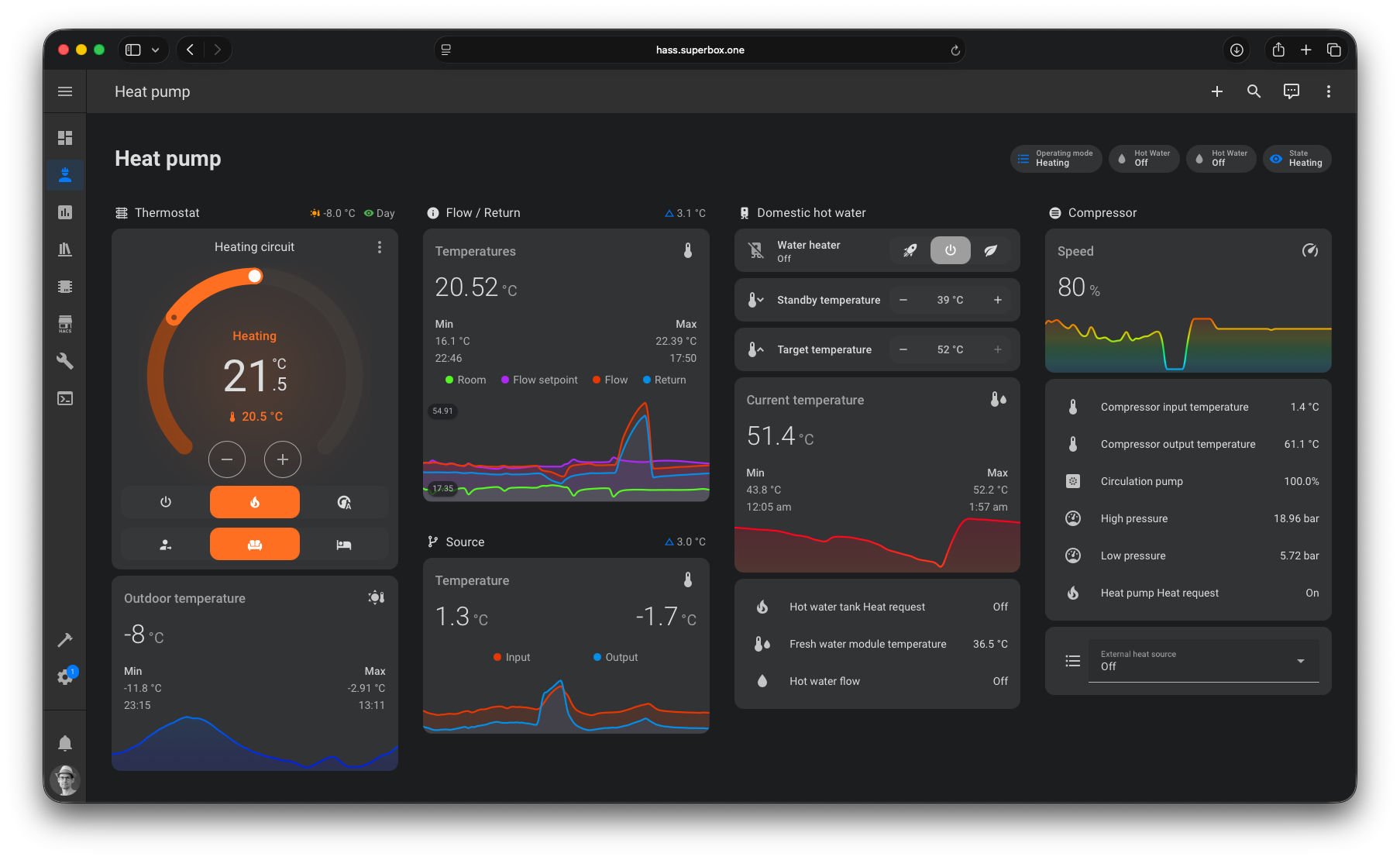
Take a look at the example page in the Wiki to create awesome dashboards in Home Assistant.
With the KEBA KeEnergy Home Assistant Integration, you can
- Connects to your KEBA heat pump via the KeEnergy Web HMI API using host and port
- Monitor temperatures, operating states and system settings
- Control operating modes and parameters directly from Home Assistant
- Build automations based on heating demand, energy usage or schedules
- This turns your heat pump into a fully integrated smart-home component
Features
- Automatic discovery of KEBA KeEnergy-based systems
- Compatible with multiple KEBA-controlled heat pumps
- Works as a Home Assistant custom integration (HACS supported)
- Provides a full set of entities – sensors, binary sensors, number and select entities for:
- Heat pump
- Heating circuit
- Solar circuit
- Hot water tank
- Buffer tank
- External heat source
Looking for more information? The Wiki contains in-depth documentation.
Supported systems
The KEBA KeEnergy Integration works with heat pumps that provide a KEBA KeEnergy Web HMI interface. It is successfully used with devices from manufacturers such as M-TEC, Windhager and ino, as well as other systems based on KEBA controls.
Requirements
- A running instance of Home Assistant with HACS installed for managing custom integrations.
- Network connectivity from the Home Assistant host to the KEBA heat pump’s Web HMI interface, including proper host/IP and port access.
Getting started

- Install this integration with HACS (search for “KEBA KeEnergy”) or copy the contents of this repository into the
custom_components/keba_keenergydirectory. - Restart Home Assistant after installation completes.
- Start the configuration flow: go to
Configuration->Integrations, click the+ Add Integrationand selectKEBA KeEnergyfrom the list. - Add IP address or hostname of your KEBA KeEnergy device.
- Enjoy :-)
Donation
I put a lot of time into this project. If you like it, you can support me with a donation.

Related projects
- KEBA KeEnergy API is a Python wrapper for the KEBA KeEnergy API.
- Lovelace Mini Graph Card is a minimalistic graph card for Home Assistant Lovelace UI
Changelog
The changelog lives in the CHANGELOG.md document. The format is based on Keep a Changelog.
Get Involved
The KEBA KeEnergy Integration is an open-source project and contributions are welcome. You can:
- Report issues or request new features
- Improve documentation or translations
- Contribute code
- Support the project by starring it on GitHub ⭐
I’m happy about your contributions to the project! You can get started by reading the CONTRIBUTING.md.




